Showing posts with label flutter. Show all posts

Monday, February 13, 2023

Flutter 3.7: What’s New

2023 has just begun with a new exciting release for Flutter i.e version 3.7. As it continues to evolve, there is no doubt that Flutter will continue to be one of the widest used cross-platform development frameworks. 

Let’s take a quick look at the improvements that come along with the new version:

Improved Material 3 Support:

Photo by Kevin Chisholm on Medium

Migration of certain widgets has improved the Material3 experience. Some of these widgets include Badge, Bottombar, Menus, DropdownMenu, Snackbar and TabBar.

In order to use the new features you just need to turn on the useMaterial3 flag in the app’s ThemeData widget.

Menu Bars and Cascading Menus:

This release of Flutter introduces the ability to create menu bars and cascading context menus. For macOS, developers can use the PlatformMenuBar widget to create a menu bar that is rendered by macOS natively, instead of by Flutter. 

Additionally, for all platforms, developers can use the Material Design menu that provides cascading menu bars (MenuBar) or standalone cascading menus triggered by another user interface element (MenuAnchor). 

These menus are fully customizable, and the menu items can be custom widgets or use the new menu item widgets (MenuItemButton, SubmenuButton).

Impeller Preview:

A new Impeller rendering engine that is now available for preview on iOS on the stable channel. The performance of Impeller is believed to be comparable or better than the Skia renderer for most apps, and it implements all but a small number of rarely used corner cases.

iOS release validation:

The flutter build ipa command now includes a feature that checks and validates certain settings for iOS apps before submission to the App Store. 

This helps ensure that the app is ready for release by informing the developer of any changes that need to be made before submission. 

This new feature is a checklist of settings to update which helps developers to prepare the app for release.

DevTools Updates:

This new SDK includes several new tooling features and improvements for developers using Flutter. One of the major improvements is in the DevTools Memory debugging tool, which has undergone a complete overhaul and includes three new feature tabs: Profile, Trace, and Diff. These tabs support all the previously supported memory debugging features and add more for ease of debugging. 

The new features include the ability to analyze current memory allocation for the app by class and memory type, investigate the code paths that are allocating memory for a set of classes at runtime, and compare memory snapshots to understand memory management between two points in time.
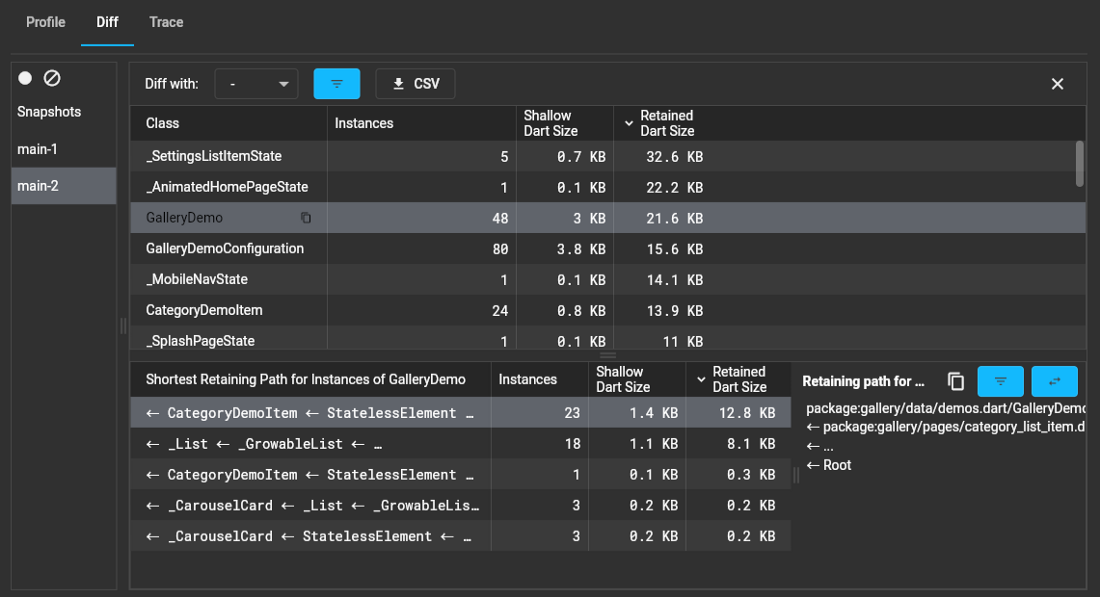
Photo by Kevin Chisholm on Medium

Custom Context Menus:

The new context menu feature in Flutter allows developers to create custom context menus for different parts of their app, giving them more control over the user experience. This feature works by adding a new contextMenuBuilder parameter to existing widgets that already show a context menu by default, such as TextField.

Developers can return any widget they want from the contextMenuBuilder, including modifying the default platform-adaptive context menu. This feature can also be used outside of text selection, such as creating an Image widget that shows a Save button when right-clicked or long-pressed.

CupertinoListSection & CupertinoListTile widgets:

Cupertino has two new widgets, CupertinoListSection and CupertinoListTile, for showing a scrollable list of widgets in the iOS style. They are the Cupertino versions of ListView and ListTile in Material.

Scrolling Improvements:

This change will allow users to return null from the itemBuilder and indicate the end of the list, making it easier for them to work with scrolling widgets like ListView. 
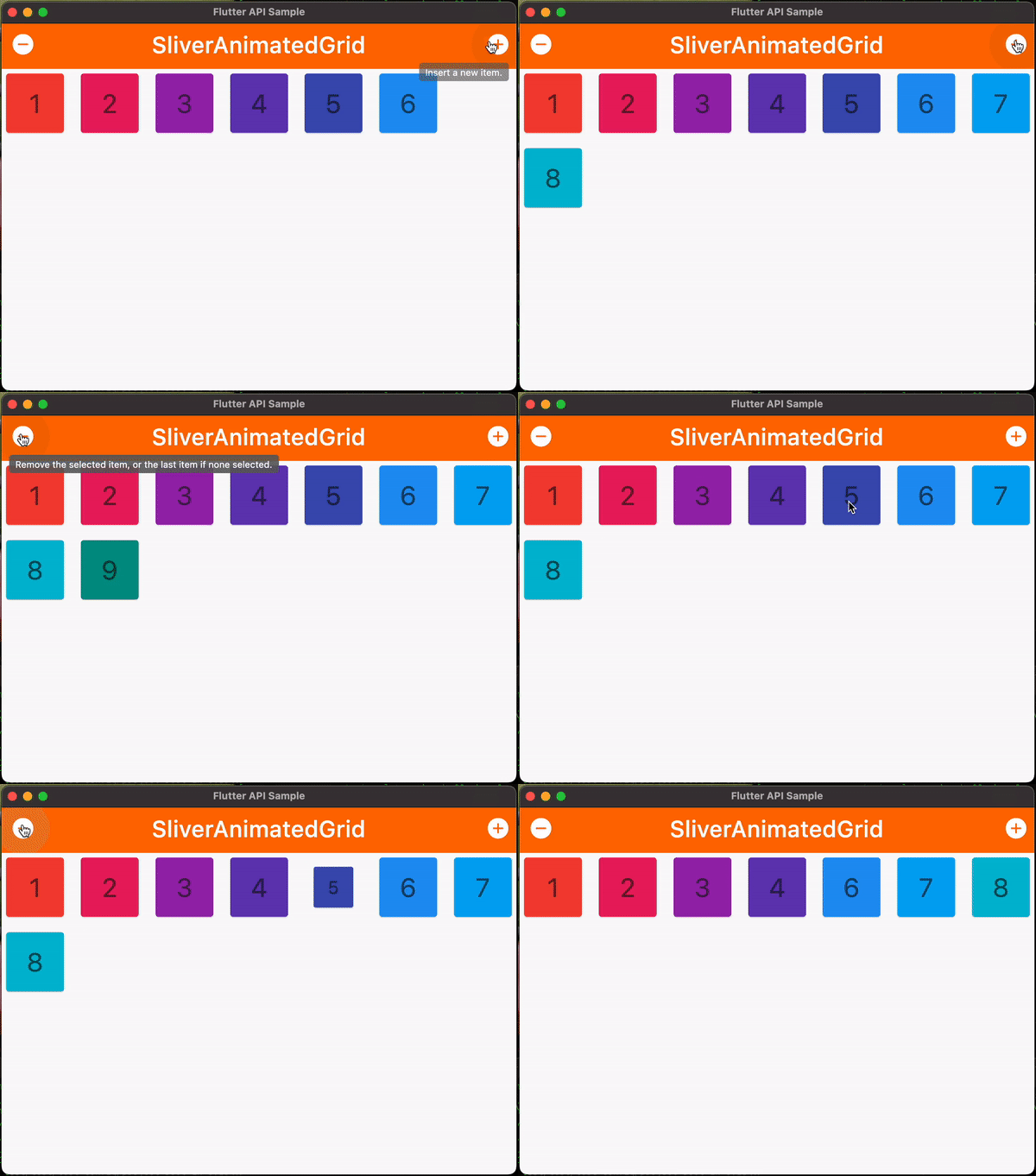
Additionally, the new Scrollbars and DraggableScrollableSheet widgets will provide more control and customization options for scroll views, and the improved handling for text selection within scrolling contexts will make it easier to select text in scrolling views.

Internationalization Tools and Docs:

Internationalization support has been completely revamped.  The gen-l10n tool now supports:

  • Descriptive syntax errors.
  • Complex messages involving nested/multiple plurals, selects, and placeholders.

Text magnifier:

The magnifying glass that appears during text selection on Android and iOS now works in Flutter. This is enabled out of the box for all apps with text selection, but if you want to disable or customize it, see the magnifierConfiguration property.

Reduce animation lag on iOS devices:

Animation quality has greatly improved with the new version of Flutter, thanks to open source contributors.

Font asset hot reload:

Including new fonts to the pubspec.yaml file previously required the app to be rebuilt, unlike other assets which could be hot reloaded. This problem has been solved in Flutter 3.7.

Custom Shader Support Improvements:

Custom shaders can now be hot reloaded and the new Flutter SDK contains a shader compiler that is responsible to correctly compile the listed shader in pubspec.yaml to the relevant backend-specific format for the target platform.

toImageSync:

This release adds new methods, Picture.toImageSync and Scene.toImageSync, to dart:ui. These methods are similar to the asynchronous methods, Picture.toImage, and Scene.toImage, but they synchronously return a handle to an Image. 

The rasterization for the Image takes place in the background and the image is kept as GPU resident when a GPU context is available, which makes it faster to draw compared to images produced by toImage. 

These new toImageSync APIs are useful for quickly snapping off an expensive-to-rasterize picture for reuse across multiple frames, applying multi-pass filters to a picture, and applying custom shaders.

Support discontinuation for macOS 10.11-10.13:

Flutter has announced that it will no longer support macOS versions 10.11, 10.12, and 10.13. This decision was made after further analysis revealed that removing support for these versions would have limited additional impact, and would simplify the codebase.

 This means that apps built against stable Flutter SDKs with this release and onward will no longer work on these versions, and the minimum macOS version supported by Flutter increases to 10.14 Mojave.

Consequently the OpenGL backend has been removed from both the iOS and macOS embedders which has reduced the compressed size of the Flutter engine by about 100KB.

Memory Management

This release of Flutter includes several improvements to memory management that aim to reduce lag caused by garbage collection pauses, lower CPU utilization due to allocation velocity and background GC threads, and reduce the overall memory footprint. 

One example of this is expanding the existing practice of manually deallocating native resources that back certain dart:ui Dart objects. Benchmarks of the Flutter framework migrated to this API have shown that these improvements can reduce 90%-ile frame build times by up to more than 30%, resulting in smoother animations with less jank. 

Photo by Kevin Chisholm on Medium

Additionally, the Flutter engine no longer registers the size of GPU images with the Dart VM, which eliminates synchronous GC work while building frames when a widget creates GPU resident images. The Flutter Engine also does a better job of dynamically updating the Dart VM with information about Flutter application state. 

Finally, for add-to-app Flutter applications, the Flutter engine now informs the Dart VM when the Flutter view is no longer displayed, this causes the Dart VM to trigger a final major GC for the Isolate associated with the view which reduces Flutter's memory footprint when no Flutter views are visible.

Sunday, July 24, 2022

How To Secure Flutter Application


1. Stay up-to-date

Getting your flutter sdk, plugin and packages up to date is the easiest and one the best ways to secure your apps. Google Flutter Team releases security fixes and patches for vulnerabilities found on the Flutter framework.


2. Secure your data

Do not use sharing settings or SQLite to store sensitive user data. This is because it is easy to open on any device. So you will be required to encrypt the stored data. For that, you can use flutter_secure_storage. This package uses Keystore for Android and Keychain for iOS


3.Jailbroken and rooted devices

Rooted Android device and jailbroken iOS device have more privileges compared to regular system. It can introduce malwares to the user's device and bypass the normal behavior of the device. There is package in Flutter that is flutter_jailbreak_detection. You can use this package to detect if your app is running on a jailbroken or rooted device. Use Root Beer on Android and DTT Jailbreak Detection on iOS.


4. Local Auth

To prevent unauthorized access we shall use the local_auth package to provide a gateway to get the access the app content as many times the user closes the app temporarily. This includes authentication with biometrics such as fingerprint or facial recognition.


5. Restrict network traffic

One way to restrict network traffic or connection to an unsecured endpoint is through explicity whitelisting your domain


6. Ceritificate pinning

You can also implement certificate pinning for your apps to restrict the secure connection the particular certificates. This ensures that the connection between your apps and your server is trusted and authentic


7. Obfuscate code

The compiled binaries and code of your apps can be reversed engineered. Some of the things that can be exposed include the strings, method and classes, and API keys. These data are either in their original form or in  plain text.

```

flutter build appbundle --obfuscate --split-debug-info=/<directory>

```

Getting Started with Flutter Bloc Pattern

 Bloc Pattern


1. Why Bloc

- Keep your code clarm organized, clean, and maintainable

- Compatible with flutter declarative programming


2. What's Bloc

- A design pattern created by Google to separate Logic from UI 

- There is many library to implement this design pattern. But IMO, you should use the flutter_bloc of Felix Angelo. It is a state management to easier your life

- For every action inside the application, there will be a relative state from it. For example, when the data is fetching, the app should be in a loading state displaying a loading animation on the screen


3. The Core Concepts

- Stream is the foundation of Bloc


3.1 Stream

- Stream is a sequence of async event. Each event is a data event or error event.

- When a stream has dispatched its event, it will also notify to all listener subscribed to it


3.2 Receive Stream

- async* means asynchronous generation function, it generates async data

- yield pushes the data (integer) through the Stream

- await keyword helps to wait for a process to finish before proceeding to the next step


```

Stream<int> dataStream() async* {

for (int i = 0; i<3; i++) {

await Future.delayed(Duration(seconds:3));

yield i;

}

}


Stream<int> stream = dataStream();


stream.listen((event) {

    print("RECEIVE data ${event.toString()}");

  });


```

- async* means asynchronous generation function, it generates async data

- yield pushes the data (integer) through the Stream

- await keyword helps to wait for a process to finish before proceeding to the next step


3.3 Cubit and Bloc


- Cubit is a minimal version of Bloc

- Cubit only emits a stream of states

- Bloc emits a stream of states and receive a stream of event


4. Flutter BLOC

4.1 BlocProvider

- A widget that creates and provides a Bloc to all of its children. A single instance of it can be provided to multi widgets within a tree hierarchy


4.2 Bloc Builder

- BlocBuilder is a widget that helps rebuild the UI based on some Bloc state 

changes

- Rebuild a large UI is a heavy cpu task to compute. That's why you need to wrap the exact part of the UI you want to rebuild inside BlocBuilder. For example, if a text is nested inside a column or a row, dont build entire the column/ row, rather to rebuild the text widge only by wrapping it inside the BlocBuilder

- If you dont provide exactly the cubit/ Bloc in Blocbuilder, it will search for the nearest parent bloc in the tree

5. Code Implementation


counter_app.dart

```

import 'package:flutter/material.dart';


import 'counter/counter.dart';


class CounterApp extends MaterialApp {

  const CounterApp({Key? key}) : super(key: key, home: const CounterPage());

}

```


counter_page.dart

```

import 'package:flutter/material.dart';

import 'package:flutter_bloc/flutter_bloc.dart';


import '../counter.dart';

import 'counter_view.dart';


class CounterPage extends StatelessWidget {

  const CounterPage({Key? key}) : super(key: key);


  @override

  Widget build(BuildContext context) {

    return BlocProvider(

      create: (_) => CounterCubit(),

      child: CounterView(),

    );

  }

}

```


counter_cubit.dart

```

import 'package:bloc/bloc.dart';


class CounterCubit extends Cubit<int> {

  CounterCubit() : super(0);


  /// Add 1 to the current state.

  void increment() => emit(state + 1);


  /// Subtract 1 from the current state.

  void decrement() => emit(state - 1);

}

```


counter_view.dart

```

import 'package:flutter/material.dart';

import 'package:flutter_bloc/flutter_bloc.dart';


import '../counter.dart';


class CounterView extends StatelessWidget {

  @override

  Widget build(BuildContext context) {

    final textTheme = Theme.of(context).textTheme;

    return Scaffold(

      appBar: AppBar(title: const Text('Counter')),

      body: Center(

        child: BlocBuilder<CounterCubit, int>(

          builder: (context, state) {

            return Text('$state', style: textTheme.headline2);

          },

        ),

      ),

      floatingActionButton: Column(

        mainAxisAlignment: MainAxisAlignment.end,

        crossAxisAlignment: CrossAxisAlignment.end,

        children: <Widget>[

          FloatingActionButton(

            key: const Key('counterView_increment_floatingActionButton'),

            child: const Icon(Icons.add),

            onPressed: () => context.read<CounterCubit>().increment(),

          ),

          const SizedBox(height: 8),

          FloatingActionButton(

            key: const Key('counterView_decrement_floatingActionButton'),

            child: const Icon(Icons.remove),

            onPressed: () => context.read<CounterCubit>().decrement(),

          ),

        ],

      ),

    );

  }

}

```

6. Summary

- Bloc is a good pattern to improve the code quality and help easier the state management in app

- Must familiar with stream and reactive programming

- Much of boilerplate code


Reference link:

- https://bloclibrary.dev/#/gettingstarted

Saturday, December 11, 2021

Flutter: Top 10 Amazing Flutter chart libraries

Flutter, an open-source development kit created by Google has grown over the years.

Features Like Hot Reload, a vast widget catalog, very good performance, and a solid community contribute to meeting that objective and makes Flutter a pretty good framework.

Because sometimes in life charts and graphs are inevitable for us to display.

In order to make sense of numerics and data overall, in the same spirit, we need beautiful, responsive, customizable and easy to implement charts.

Flutter OpenSource chart libraries have the answers we need.

Here is a collection of 10 best chart libraries for Flutter to implement in your next Flutter project.

1. Fl_animated_linechart
Animated line chart library for a flutter, with tons of customization options, currently supports line and area


Features
  • Support for DateTime axis
  • Multiple y-axes, supporting different units
  • Highlight selection
  • Animation of the chart
  • Tested with more than 3000 points and still performing

2. Bezier Chart
A beautiful bezier line chart widget for flutter that is highly interactive and configurable.


Features
  • Multi bezier lines
  • Allow numbers and datetimes
  • Gestures support like touch, pinch/zoom, scrolling
  • Highly customizable

3. Flutter_candlesticks
An Elegant OHLC Candlestick and Trade Volume charts library for the Flutter.


Features
  • Easily create price watch apps using Flutter.
  • Suited for CryptoCurrency and share market apps
  • Fully customizable

4. Flutter Circular Chart
A library for creating animated circular chart widgets with Flutter, you can Create easily animated pie charts and radial charts by providing them with data objects they can plot into charts and animate between


Features
  • Beautifully animated circular charts
  • Fully customizable
  • Supports radial charts with multiple concentric circles

5. Flutter_charts
Flutter Charts is a charting library for Flutter, written in Flutter. Currently, the column chart and line chart are supported.


Features
  • Automatically checks for the X label overlap.
  • Plenty of examples available for easy start
  • The highly customizable flutter chart library

6. Flutter Plot
A pretty plotting package for Flutter apps. Sizing and auto adding aren’t great right now, but tinkering with padding and font size will allow for you to align things well.

Features
  • Fully customizable
  • examples available for an easy start
  • you can create super neat plots

7. Charts by Google
Charts is a general charting library Created by Google for the Flutter mobile UI framework.


Features
  • Wide Range of Charts Available
  • Includes charts like Line chart, combo chart, Axes chart e.t.c
  • A charting package for Flutter, supporting both Android and iOS.

8. Fcharts
With Fcharts you can Create beautiful, responsive, animated charts using a simple and intuitive API.


Features
  • A work-in-progress chart library for Flutter.
  • Responsive charts
  • simple and intuitive API

9. FL Chart
FlChart allows you to draw your charts in the Flutter, It’s a powerful Flutter chart library, currently supporting Line Chart, Bar Chart, and Pie Chart

Features
  • Handles Touches
  • Handles Animations
  • You can create awesome BarCharts
  • Also supports LineChart and PieChart

10. MPFlutterChart
A powerful Flutter chart view/graph view library, supporting line- bar- pie- radar- bubble- and candlestick charts as well as scaling, dragging and animations.


Features
  • Tons of charts available
  • supports dragging and animations
  • Highly customizable

Conclusion
That’s my collection of the best chart libraries for Flutter, if you have a great component and didn’t see it in here, leave a suggestion in the comments below. Have a wonderful charting and visualization experience!
#flutter #programming

Reference